OpenAI shut the browser, not the job
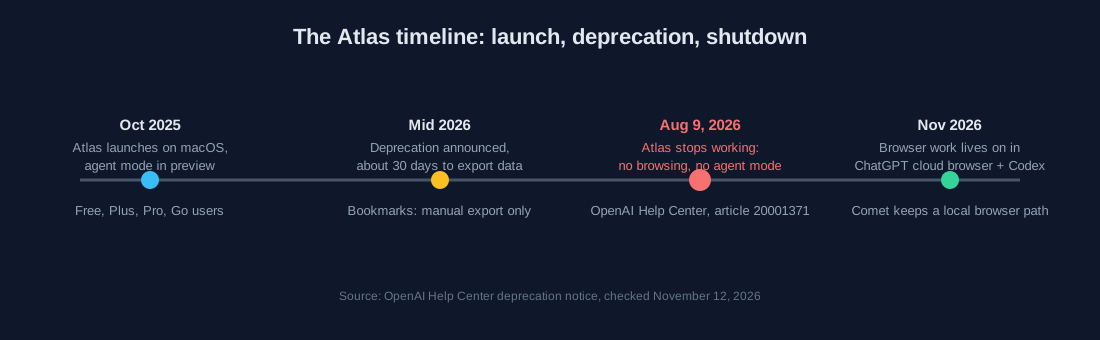
ChatGPT Atlas, the AI browser OpenAI announced in October 2025, is gone from the lineup. OpenAI's help center states that Atlas is scheduled to stop working on August 9, 2026; in the notice's own words, after that date it "may no longer open, browse, or support browser-based agentic workflows." Bookmarks, open tabs and history do not transfer automatically, and the notice gives users roughly a 30-day window to export what they need.
The capabilities simply moved house. The same notice points to two successors inside the ChatGPT subscription: a cloud browser that handles everyday signed-in web tasks for regular users, and Codex for developer-shaped browser work, which sits outside this comparison. Any 2025 comparison that ends with "buy Atlas" now recommends a product that cannot open a page.
 🔍 View full resolution
The two paid paths that replaced it
Perplexity kept a dedicated browser. Comet went free for everyone on October 2, 2025, after launching as a Max-only product at $200/month, a history documented by the third-party pricing site eesel, and Perplexity's plan comparison now marks Browser Agent queries as unavailable on the Free plan. OpenAI's side needs splitting: agent mode inside the chat product ships with paid plans, and OpenAI's help center quotes quotas in monthly messages, while the workspace product ChatGPT Work meters differently, covered below.
| Dimension | Comet (Perplexity) | ChatGPT cloud browser |
|---|---|---|
| The browser itself | Free download since October 2, 2025; first four months were Max-only at $200/mo | No standalone app; runs inside ChatGPT on web and mobile |
| Cheapest agent access | Pro $20/mo or $200/yr | Plus $20/mo, agent mode at 40 agent messages/mo |
| Top consumer tier | Max $200/mo or $2,000/yr, Max Assistant, highest weekly agent limits (no number published) | Pro, agent mode at 400 agent messages/mo |
| Enterprise | Pro $40/seat: 80 agent queries/mo; Max $325/seat: 800/mo | Business and Enterprise, agent mode at 40 msgs/mo on the standard quota, or 30 credits/msg on flexible pricing |
| Login handling | Your own session in a local browser | Cloud session; takeover mode pauses screenshots for password entry |
| Local files | Browser and downloads stay on your machine | Cloud only, cannot reach local files |
Prices come from Perplexity's pricing and help pages and OpenAI's help center, checked November 12, 2026; the monthly enterprise caps of 80 and 800 agent queries appear on Perplexity's plan comparison and were cross-checked against third-party price trackers (opentoolhq, merlin.computer) in October 2026. Perplexity does not publish a specific monthly agent count for consumer Pro or Max: its plan guide lists them as monthly limits at average use, and as the highest weekly limits, without numbers.
Sign-up: perplexity.ai/comet
Sign-up: chatgpt.com
Logins, local files and the metering that decides the bill
Logins are the sharpest line between the two. Comet runs on your machine, so sites see your own session, cookies and profiles exactly as you left them. ChatGPT's cloud browser runs on OpenAI infrastructure: when a task reaches a password field, agent mode pauses and hands you the virtual browser through takeover mode, and OpenAI documents that screenshots are not captured while you type.
Local access is the second line. The ChatGPT browser is cloud-only and cannot touch files on your computer, as third-party reviews of ChatGPT Work, the workspace surface that carries the cloud browser, have documented since the migration. Comet keeps browsing local, so downloads and saved pages land on your disk.
Metering decides the real bill, and it splits three ways. Perplexity sets hard enterprise caps, 80 Browser Agent queries a month on Enterprise Pro at $40 per seat and 800 on Enterprise Max at $325 per seat, while consumer Pro and Max get no published count, only floating monthly limits at average use. Agent mode inside the ChatGPT chat product counts messages per month: 40 on Plus and Business, 400 on Pro, with flexible enterprise pricing billing 30 credits per message. The ChatGPT Work workspace follows the Codex structure with an allowance per 5-hour window, per third-party reviews. The same "$20 a month" buys different amounts of agent work depending on which of these meters your tasks land in.
Which one for which job
 🔍 View full resolution
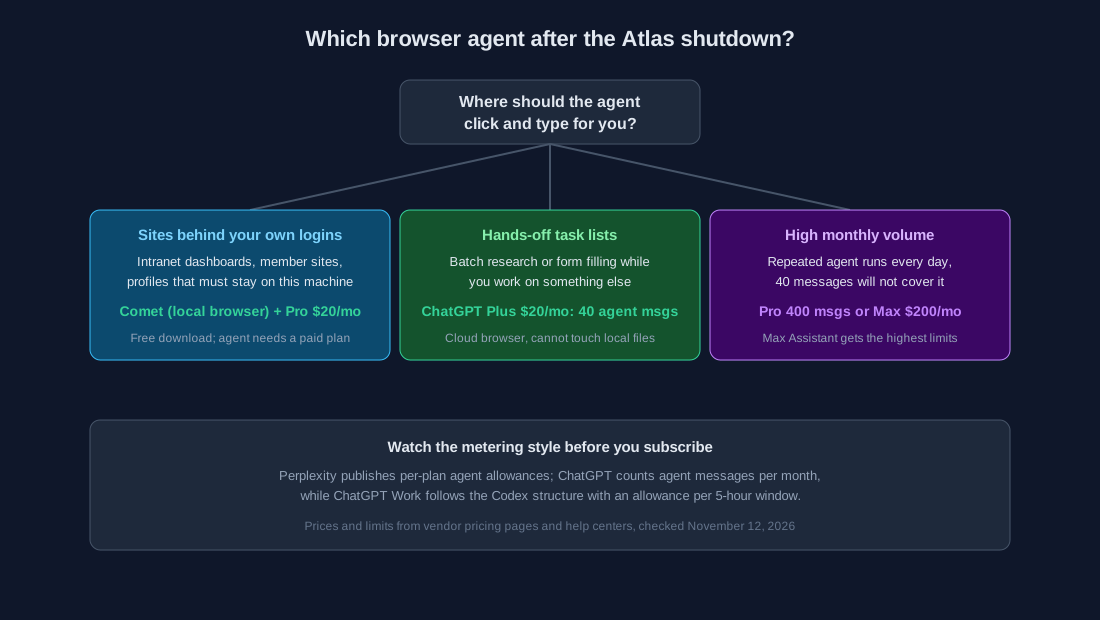
Choose Comet if: the agent must work inside sites that require your own logins and you want the session on your machine; budget from the Pro tier, since agent features do not run on Free, and note that Perplexity publishes no monthly agent count for Pro, so heavy users should trial month by month.
Choose ChatGPT Plus if: your tasks are short, occasional and cloud-safe, and the fixed monthly agent count covers them; predictable budgeting is part of the deal.
Choose a high tier if: volume is the constraint. ChatGPT Pro and Perplexity Max with Max Assistant both target daily agent use, and Perplexity's enterprise plan page publishes hard caps of 80 and 800 queries that keep procurement math predictable.
Skip both if: the job is pure search. Neither product beats a plain $20 search subscription at answering questions; browser agents earn their premium only when tasks involve clicking through pages.