The free plan names chat and the terminal
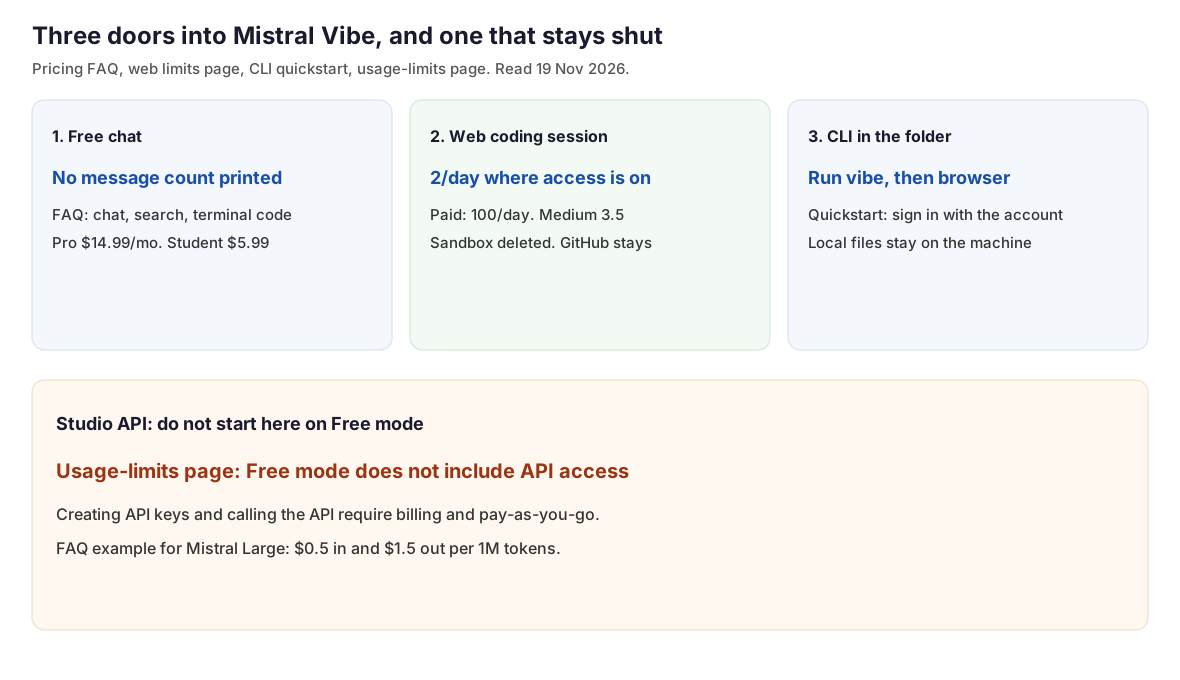
On 19 November 2026 the pricing FAQ says the Free plan provides limited access to Vibe: the latest models, chat, search, creation, and Vibe for code for agentic coding in the terminal. The same answer says Free also includes Mistral Studio. The card above the FAQ lists limited messages, limited web searches, limited coding sessions, basic image generation, and 100+ connectors. That card does not print a message count, a search count, or a coding-session count.
Pro is printed at $14.99 a month, excluding taxes. The FAQ says verified students can get Pro for $5.99 a month, normally $14.99. The FAQ's example of a higher Pro ceiling is image generation, up to 40 times the Free allowance. A separate FAQ line, labeled Flash answers, prints 200 a day on Team and 150 a day on Pro. That line is not the message count the card left blank. The API example on the same FAQ prices Mistral Large at $0.5 per million input tokens and $1.5 per million output tokens. Batch is 50 percent less, and cached input is up to 90 percent less. No chat was sent, and no plan was purchased, for this page.
 🔍 View full resolution
Try it: mistral.ai/products/vibe
Pricing: mistral.ai/pricing
A web session is one sandbox
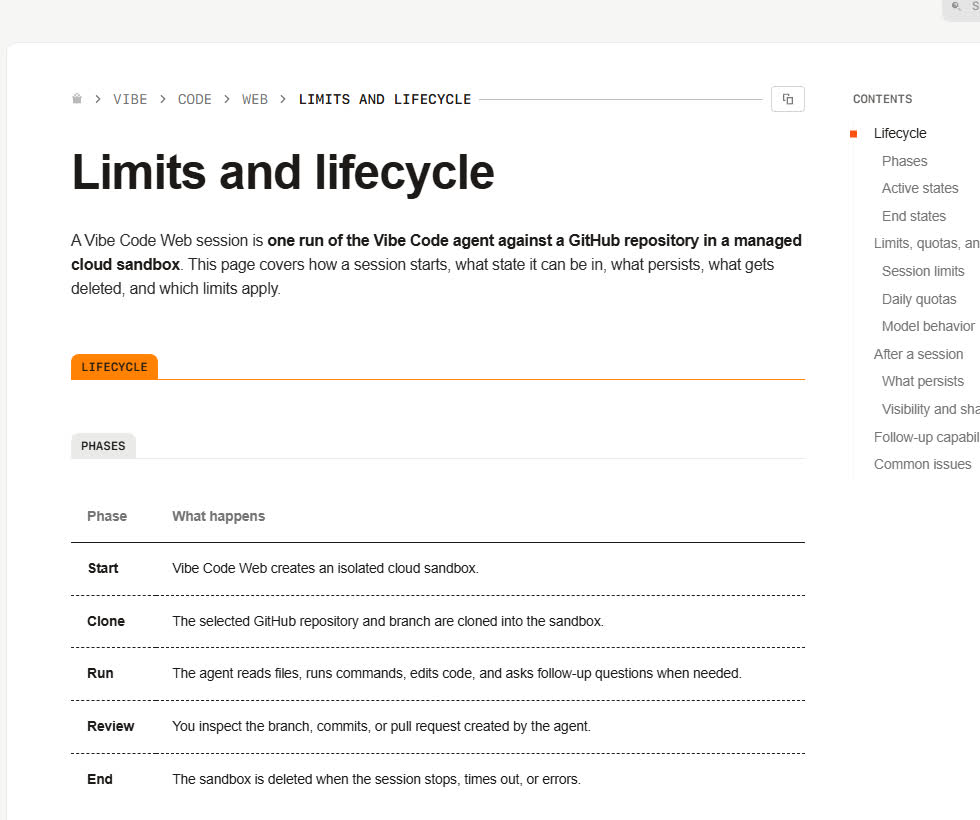
The limits page, read the same day, defines a Vibe Code Web session as one run of the agent against a GitHub repository in a managed cloud sandbox. The phase table is Start, Clone, Run, Review, End. Start creates the sandbox. Clone brings in the selected repository and branch. The End row says the sandbox is deleted when the session stops, times out, or errors. The word on the page is stops. A pushed branch or pull request does not end the session. Follow-up prompts, review comments, and CI failures stay inside that run.
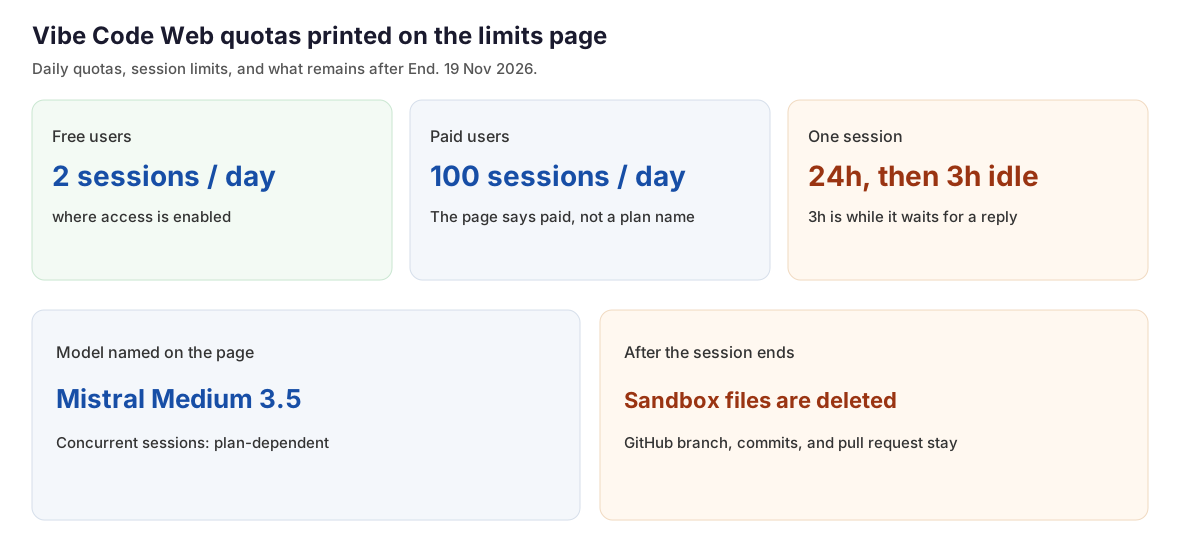
Daily quotas on that page: free users, 2 sessions a day, where access is enabled. Paid users, 100 sessions a day. The row says paid users. It does not name Pro, Team, or Enterprise. Maximum duration is 24 hours. While the agent is waiting for a reply, the inactivity timeout is 3 hours. Concurrent sessions are plan-dependent. The model line says these sessions use Mistral Medium 3.5.
Sandbox files and build artifacts are deleted when the sandbox goes, unless they were committed. GitHub branches, commits, and pull requests remain. History can still be opened, and an inactive session cannot be resumed. The page says to start a new session. That new run is another row on the daily count. Cancellation, interrupt, and a manual stop are listed as not available yet, under capabilities planned after the May 28 launch. The page does not print a year for that May 28. The word stops on the End row is not a button the page says you can press. No web session was opened for this page.
 🔍 View full resolution
 🔍 View full resolution
The CLI starts in the project folder
The CLI quickstart, read the same day, is the path when the files have to stay on the machine. The limits page says the web product runs in a cloud sandbox, and it sends local files, local services, local secrets, and hardware-specific dependencies to the CLI or the VS Code extension. The quickstart lists macOS, Linux, or Windows, and Python 3.12 or later for a manual install. uv downloads Python if it is missing. A Mistral account is optional when the CLI points at a local model, or at a key issued by another service whose API is OpenAI-compatible.
On macOS or Linux the one-liner is curl -LsSf https://mistral.ai/vibe/install.sh | bash. The manual line, and the Windows line after uv is installed, is uv tool install mistral-vibe. Open a terminal in the project directory and run vibe. The wizard asks for a theme, then a sign-in. Launch browser, marked recommended, signs in with the Mistral account. If the browser stays closed, press c to copy the sign-in URL. The other choice pastes an API key. The quickstart says a key from Vibe, then Code, then Vibe CLI works in Free mode, on a paid plan, or with pay-as-you-go enabled. The sample prompt on that page asks the CLI to list the files in the directory and explain each one. A shell command typed in the CLI needs a ! prefix, as in !git status. The agent runs commands with approval. Setup is done when vibe --version prints a version and a prompt returns with the project's context. A folder that already contains AGENTS.md or a Vibe config is asked for trust before that config loads.
The usage-limits page, read the same day, is narrower about keys. Free mode includes a monthly budget for trying Vibe and Studio. It does not include API access. Creating API keys and using the API require billing activation and pay-as-you-go. This page does not merge those two sentences into one key. The quickstart's recommended click is browser sign-in on the account. The usage-limits sentence is about the API. This page did not install the CLI and did not create a key. The quickstart also does not print a daily session count for the CLI. The 2-a-day line is on the web limits page only.
Install: docs.mistral.ai/getting-started/quickstarts/vibe-code/install-cli
Usage limits: docs.mistral.ai/admin/billing-usage/usage-limits
Which door to open
| Door | What the page prints | Price printed beside it |
|---|---|---|
| Free chat | Limited messages, searches, and coding sessions. No count on the card | Free. Pro $14.99 a month before tax. Students $5.99 |
| Vibe Code Web | 2 sessions a day where access is enabled. Paid users: 100 a day. 24 hours. 3 hours waiting. Medium 3.5. Sandbox deleted | The limits page prints no dollar price |
| CLI in the folder | Run vibe, then Launch browser. A Vibe CLI key is described as working in Free mode. No daily session count on this page | Uses the plan. No CLI dollar rate on the quickstart |
| Studio API | Free mode does not include API access. Keys and calls need billing and pay-as-you-go | FAQ example: Mistral Large $0.5 in and $1.5 out per 1M tokens |
Choose the product page if the job is a chat, a web search, or a short task on Free. The FAQ includes those and does not print a message count. Pro at $14.99 a month, before tax, is the paid chat step on that page. Verified students are $5.99 a month.
Try it: mistral.ai/products/vibe
Choose Vibe Code Web if the repository is on GitHub and 2 sessions a day, where access is enabled, cover the work. Commit before End, because sandbox files leave with the sandbox. The model named there is Mistral Medium 3.5. Paid users are listed at 100 sessions a day. The pricing page does not say which paid plan that 100 belongs to.
Limits: docs.mistral.ai/vibe/code/web/limits-and-lifecycle
Choose the CLI in the project folder if the files, services, or secrets have to stay on the machine. Run vibe there and take Launch browser. The 2-session line is not on the CLI quickstart.
Install: docs.mistral.ai/getting-started/quickstarts/vibe-code/install-cli
Leave the Studio API until billing is on. The usage-limits page says Free mode does not include API access. The FAQ's worked price for Mistral Large is $0.5 per million input tokens and $1.5 per million output tokens.
Usage limits: docs.mistral.ai/admin/billing-usage/usage-limits
Pricing: mistral.ai/pricing