Free Colab still has no hour count
Colab's FAQ, fetched 15 November 2026, says the free version gives very limited access to GPUs, and that a free notebook can run for at most 12 hours, depending on availability and usage. The same FAQ says overall usage limits, idle timeouts, and available GPU types are not published, because they change. A Colab notebook titled Making the Most of your Colab Subscription says the free version grants Nvidia T4 GPUs subject to quota and availability. None of those pages prints a weekly or monthly free GPU-hour allowance.
Try it: colab.research.google.com
Prices that are actually on the card
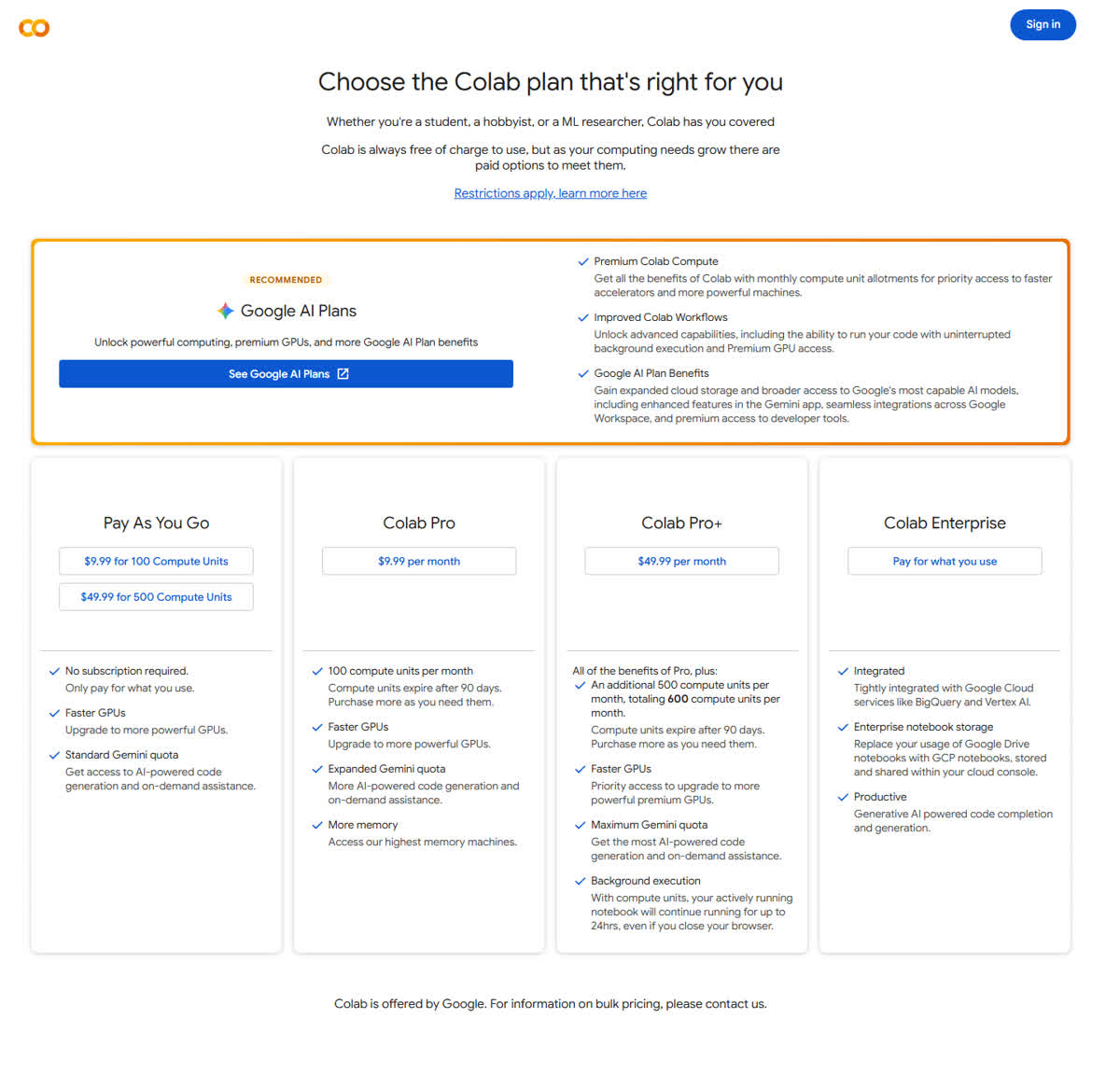
The pricing page on the same day shows four paid cards. Pay as you go: $9.99 for 100 compute units, or $49.99 for 500, with no subscription. Colab Pro: $9.99 per month and 100 compute units. Units expire after 90 days. Colab Pro+: $49.99 per month, an extra 500 units on top of Pro's 100, so 600 compute units a month, plus background execution for up to 24 hours while the balance stays positive. Colab Enterprise is labeled pay for what you use, with no unit price on the card. Google does not print how many GPU hours one compute unit buys. At a zero balance, the FAQ says access falls back to whatever the free tier can support.
 🔍 View full resolution
Pricing: colab.research.google.com/signup/pricing
Signup: colab.research.google.com/signup
Kaggle still prints a weekly number
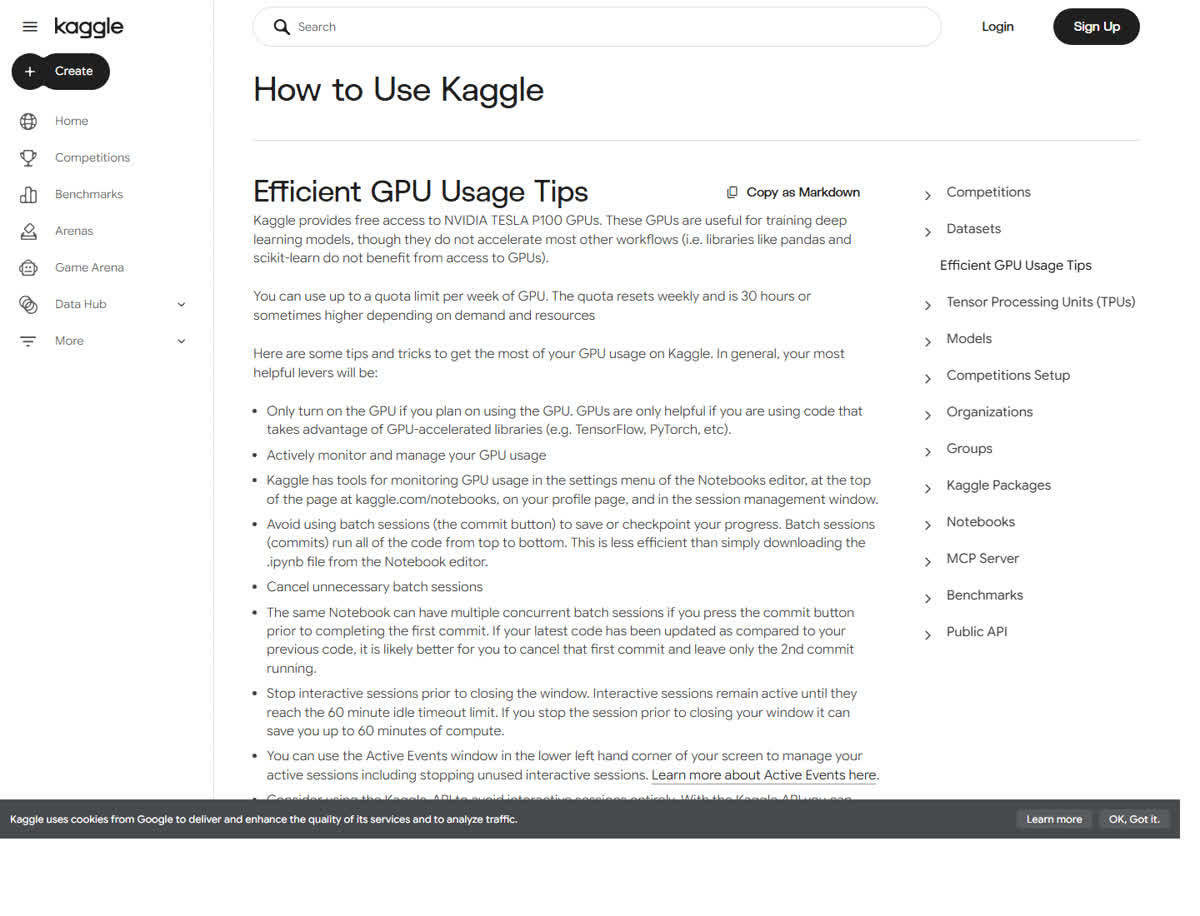
Kaggle's GPU tips page, fetched the same day, says the quota resets weekly and is 30 hours or sometimes higher depending on demand and resources. The page still opens by offering free NVIDIA Tesla P100 access. The notebooks spec page still prints two GPU blocks side by side: one P100 (4 CPU cores, 29 GB RAM) and T4 x2 (two T4 GPUs, 4 CPU cores, 29 GB RAM). Session caps on that page are 12 hours for CPU and GPU, and 9 hours for TPU. Roundups that mark the P100 as retired do not match these two pages as fetched on 15 November 2026.
 🔍 View full resolution
Two idle clocks live on two pages. The notebooks guide says an interactive editing session ends after 20 minutes without a code change. The GPU tips page says an interactive session keeps running until a 60-minute idle timeout, and that the open session spends quota. Stop it from the Active Events window when the run is finished.
The notebooks page also documents an experimental Colab link: File, then Link to Colab, in the notebook editor. Colab Pro adds 15 GPU hours a week on Kaggle. Pro+ adds 30. Those hours do not consume Colab compute units. Kaggle calls the offer a limited-time promotion and says the amount can change without notice.
 🔍 View full resolution
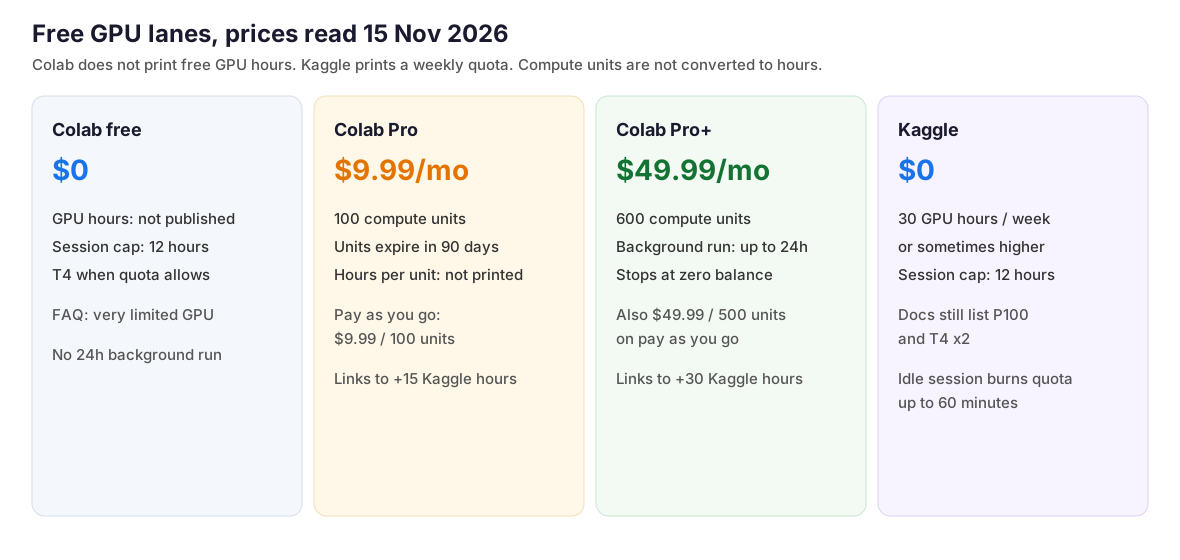
| Item | Colab free | Colab Pro | Colab Pro+ | Kaggle |
|---|---|---|---|---|
| Price | $0 | $9.99/month | $49.99/month | $0 |
| Allowance on the page | GPU hours not published. Session max 12 hours | 100 compute units/month, expire after 90 days | 600 compute units/month. Background run up to 24 hours | 30 GPU hours/week or sometimes higher. Session max 12 hours. Pro link +15 hours, Pro+ link +30 hours, experimental |
| Hardware named | T4 when a quota is available | Faster GPUs, types vary | Premium GPUs, types vary | P100 and T4 x2 both still listed |
| Pay as you go | Separate card, no subscription: $9.99 for 100 compute units, or $49.99 for 500 compute units. | |||
Signup: kaggle.com
Weekly quota: kaggle.com/docs/efficient-gpu-usage
Hardware specs: kaggle.com/docs/notebooks
Which lane fits the job
Choose Kaggle if: the job needs a weekly hour figure on a public page. The published line is 30 hours or sometimes higher, at $0, with a 12-hour session cap.
Choose Colab free if: the job is a short interactive notebook, a T4 is enough when one is free, and an unpublished cutoff is acceptable. Plan around the 12-hour maximum. There is no weekly allowance to plan around.
Choose Colab Pro if: $9.99 a month for 100 compute units matches the budget. Leave the units as units. The pricing page does not convert them into GPU hours.
Choose Colab Pro+ if: the notebook has to keep running for up to 24 hours after the browser closes. That is $49.99 a month and 600 compute units. At a zero balance, the FAQ says access falls back to whatever the free tier can support.
Link the accounts if Colab is already paid. An active Pro or Pro+ subscription can add 15 or 30 Kaggle GPU hours a week without spending Colab units. The offer is marked experimental.