Comparison Scope and Core Findings
Published pricing, free limits, and paid features are based on current vendor documentation and product pages: Grammarly rates reflect its official plans page, while QuillBot figures are anchored on official help center documentation and cross-checked against standard enterprise pricing baselines. This comparison focuses on pricing tiers, free-level allowances, and feature boundaries rather than subjective blind rewriting tests.
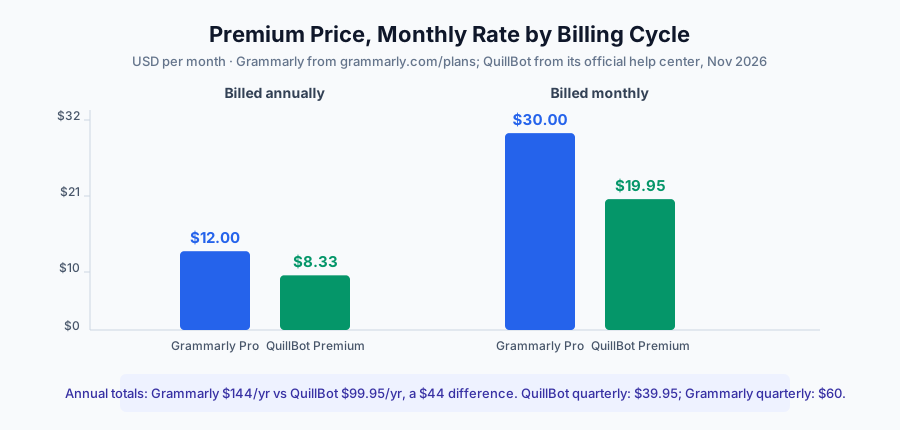
The short answer: if budget leads, QuillBot's annual plan costs $99.95 a year. If you want correction as you type across every app, Grammarly's annual plan costs $144. Both vendors price aggressively only on annual billing; month to month costs about 2.4 to 2.5 times the effective annual monthly rate.
Pricing Matrix: Every Published Plan, Including Teams
Neither vendor hides complexity in its public plans: one free tier, one individual premium tier, plus a team option. Here is the full matrix in USD.
| Plan | Grammarly | QuillBot |
|---|---|---|
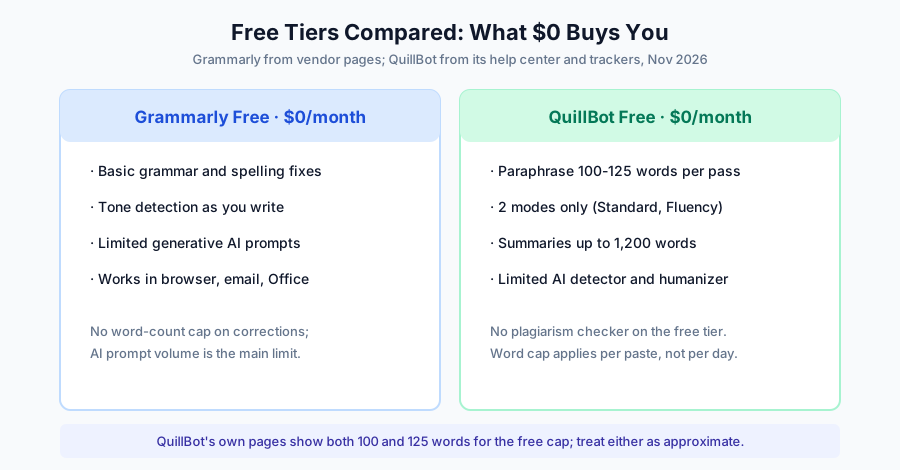
| Free tier | $0: grammar, spelling, tone, limited AI prompts | $0: paraphrase 100 words/pass (help-center figure; pricing page showed 125 in early November), 2 modes, 1,200-word summaries |
| Premium, monthly | $30/mo | $19.95/mo |
| Premium, quarterly | $60 / 3 months | $39.95 / 3 months |
| Premium, annual | $144/yr ($12/mo) | $99.95/yr ($8.33/mo) |
| Plagiarism checker | Not listed on published plan pages | 25,000 words/month on Premium |
| Team / enterprise tier | Enterprise, contact sales | Team, price not published |
Sources, item by item: Grammarly's three price points ($30 monthly, $60 quarterly, $144 annual) come from its plans page and official support documentation. QuillBot's 25,000-word plagiarism quota and 6,000-word summaries come from its official help center and pricing page, with consistent records across multiple trackers in October and November 2026. QuillBot's Team tier carries no published price on its pricing page.
 🔍 View full resolution
Free Tiers: 100 Words of Rewriting or Unlimited Proofreading
QuillBot's free plan caps each paraphrase at 100 words in the Standard and Fluency modes only, according to its official help center article updated October 22, 2026. QuillBot's premium page and several pricing trackers showed a 125-word cap in early November 2026, so treat the two figures as coexisting and check the live page before you depend on either. Free users also get 1,200-word summaries plus limited AI detector access, and no plagiarism checker.
Grammarly Free runs the other way: grammar and spelling corrections carry no word-count cap, tone detection is included, and the limited resource is the generative AI prompt allowance. Your core proofreading never runs out.
 🔍 View full resolution
Sign-up entry: grammarly.com/plans
Sign-up entry: quillbot.com
What Premium Actually Adds
QuillBot Premium removes the per-paste word cap, opens all nine built-in rewrite modes and lets you create an unlimited number of custom ones, compares mode results side by side, raises summaries to 6,000 words, and bundles plagiarism checks of up to 25,000 words a month with full access to the Humanizer (AI-trace rewriting) and AI detector. One detail worth knowing before you pay: QuillBot's Trust Center states that it trains on user inputs by default, with an opt-out available, while Team plan inputs stay out of training.
Grammarly Pro concentrates its value in coverage. The $144 annual plan puts live correction suggestions inside Gmail, Outlook, Google Docs, Word and most browsers, adds the full generative AI prompt allowance, and keeps every fix where you already write. If your day happens inside other people's apps, that in-place correction is what you are paying for.
The Verdict: Which One Should You Pay For?
Choose QuillBot if: you rewrite more than you proofread. Students, non-native English writers and content editors who rework paragraphs weekly get nine modes, a plagiarism checker and unlimited rewrites for $99.95 a year, about 31% below Grammarly's annual price.
Choose Grammarly if: your drafts must be correct the moment you send them. The $144 annual Pro plan buys correction everywhere you already write, from email to shared documents, which removes the paste-revise-repaste loop a web-only paraphraser adds to your day.
Run both free tiers first: paste your typical paragraph into QuillBot's free paraphraser and see whether the word cap bites, then let Grammarly Free sit in your browser for a week. A week of real usage settles the choice faster than any table.