What TK Is: Medium Moves Pre-Publishing Work Into Its Own App
TK is a standalone writing app Medium opened to everyone on November 9, 2026, named after the newsroom placeholder 'to come.' An invite-only phase that started September 16 kept it inside the Friends of Medium circle; TechCrunch reported the public launch this week, free for anyone with a Medium account, web-only at launch, with a desktop app on the roadmap and no ship date.
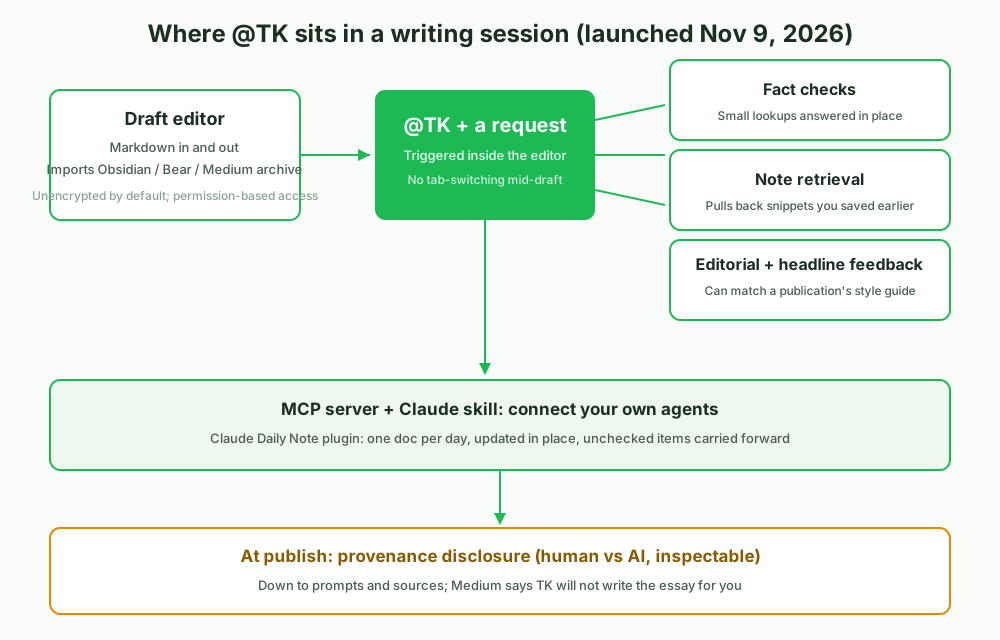
Medium CEO Tony Stubblebine draws the boundary in one line, as relayed by TechCrunch and Unite.AI: 'TK is the gym and Medium is the stage.' The app handles drafts, source material and practice before publishing, kept separate from the platform itself. It imports your Medium archive plus Bear and Obsidian vaults, moves Markdown in and out, and stores writing unencrypted by default, per TechCrunch (the report does not split transport from storage encryption), relying on user-controlled access permissions instead.
What @TK Does: Fact Checks, Retrieval and Editorial Notes, Not Ghostwriting
The core interaction is typing '@TK' plus a request inside the editor. It answers the small factual questions you would otherwise chase in another tab, pulls back snippets you saved while an idea was still forming, and returns editorial and headline feedback, including matching a draft to the style guide of a Medium publication. Every morning it generates a writing prompt that can reference your earlier notes, and searches, tags and libraries can be summarized wiki-style, so scattered notes get a path back into new drafts.
Two boundaries matter. First, Medium says outright that TK will not write your essay; the positioning is assistance, not ghostwriting. Second, per Medium's launch post and Unite.AI's writeup, it connects to your own agents through an MCP server and a Claude skill; Medium's Claude Daily Note plugin shows the pattern: an outside agent, running in Claude Cowork or Claude Code, creates one document per day, updates it in place and carries unchecked items forward. On the publishing side, authors can attach disclosure notes marking what was human-written versus AI-written, inspectable down to prompts and source material.
 🔍 View full resolution
Pricing: Free TK, $9 Rytr, $20 per Seat for Notion AI
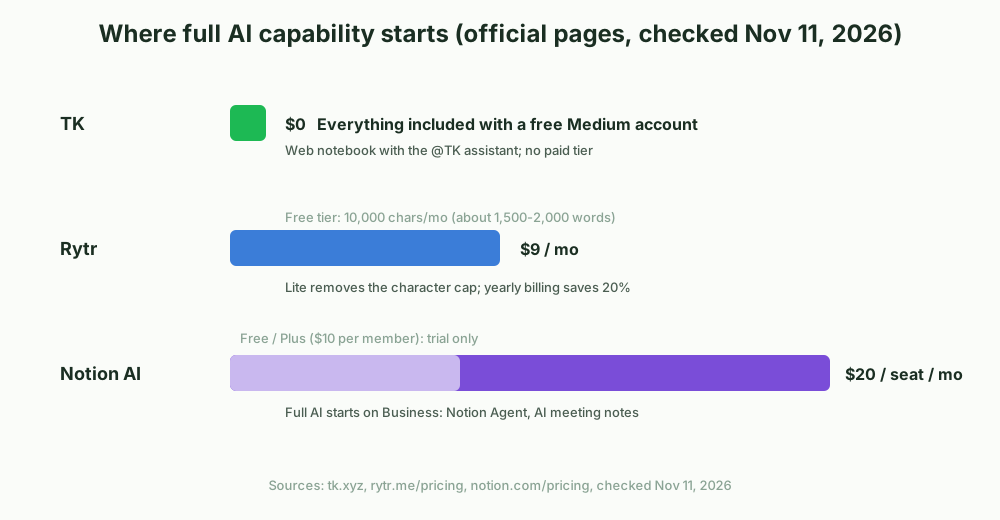
The three tools bill in completely different ways. Prices below come from each vendor's own pricing page, checked November 11, 2026.
| Dimension | TK | Rytr | Notion AI |
|---|---|---|---|
| Lowest price with full AI | $0, any free Medium account | $9/mo (Lite); free tier caps 10,000 chars/mo | $20 per member/mo (Business); Free and Plus include a trial only |
| Shape | Standalone web notebook with the @TK assistant | Short-form generator, 40+ use-case templates, 30+ languages | AI inside the workspace, includes Notion Agent and AI meeting notes |
| Generation boundary | Will not write the essay for you | Generates from templates on request | Generates and edits docs, autofills databases |
| Other limits | No desktop app, unencrypted storage, no accuracy benchmark published | Long-form is not its strength; cap lifts start at Lite | Per-seat billing scales with headcount |
Notion does not include full AI on Free or Plus ($10 per member); both carry only a trial. The complete set starts on Business at $20 per member per month. Rytr's free tier caps output at 10,000 characters a month, roughly 1,500 to 2,000 words by average English word length, per third-party reviews; Lite at $9 removes the cap, and yearly billing saves 20 percent. TK has no paid tier; the gate is a free Medium account.
Try TK (free with a Medium account): tk.xyz
Sign up for Rytr's free tier (Get Free on the pricing page): rytr.me/pricing
Sign up for Notion's free plan (Sign up on the pricing page): notion.com/pricing
 🔍 View full resolution
The Numbers Behind It, and Which One Fits Your Work
Medium's own State of Writing Report 2026, based on a Harris Poll survey of the writers polled, frames the trust gap: over the previous three months, 71 percent had used AI in their writing practice, 60 percent distrust AI-produced writing of their own, and 69 percent distrust it from others. TK's disclosure mechanism and no-ghostwriting positioning line up with that gap, in this article's reading.
Use TK if: you write in the Medium ecosystem, or you want a free feedback bench for drafts with retrieval over your own notes; an assistant plus MCP agent access is hard to find for free elsewhere. Accept the limits: web only, unencrypted storage, no long-form generation.
Pick Notion AI (Business, $20 per member per month) if: your writing lives next to projects, databases and meeting notes, and you want AI woven into the workspace; the Notion Agent is something TK does not attempt.
Pick Rytr (Lite, $9 per month) if: your output is short-form social copy and email, where lifting the character cap matters more than editorial taste.
The detail worth watching is provenance. If disclosure notes become an industry norm, writing tools gain a new axis of comparison: whether the chain from prompt to published text can be inspected.