Why Windsurf Gave Up Its $15 Price Advantage
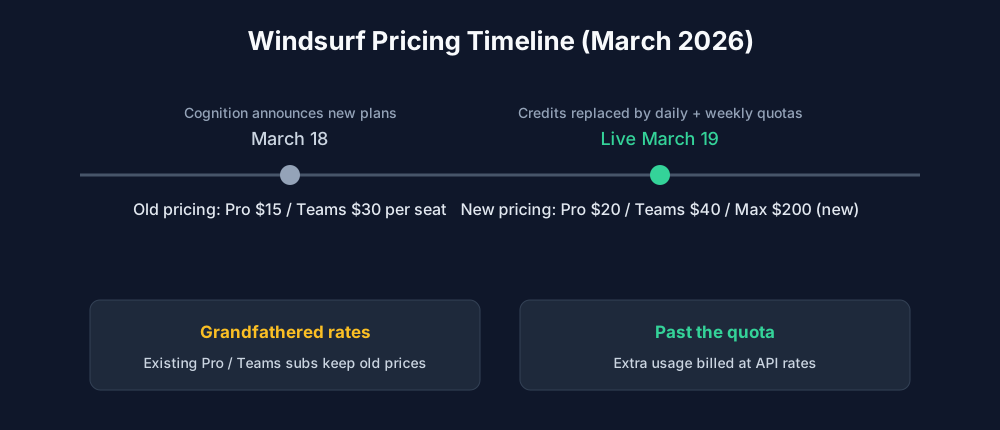
Windsurf spent 2025 as the budget pick among AI code editors: Pro cost $15 per month with 500 credits, $5 under Cursor Pro, per the archived Windsurf pricing page. On March 18, 2026, Cognition announced a full pricing overhaul, effective the next day: credits were gone, replaced by usage quotas that refresh on daily and weekly cycles. Pro moved from $15 to $20 per month (a 33% increase), Teams went from $30 to $40 per seat, and a new Max tier appeared at $200 per month.
Per Cognition's March 18, 2026 announcement, existing paid subscribers keep their old price indefinitely, and each received a free extra week to try the quota system. That grandfathering clause is the only reason long-time Windsurf users still pay less than Cursor; every new Pro subscriber now pays the same $20 as Cursor Pro, with Teams at $40 per seat and Max at $200.
Try it: windsurf.com/pricing
 🔍 View full resolution
Pricing Matrix: Every Plan Side by Side
After the change, both vendors charge identical headline prices at every individual tier. The differences moved into what each plan includes.
| Plan | Windsurf (from Mar 19, 2026) | Cursor |
|---|---|---|
| Pro | $20/mo, daily + weekly quotas | $20/mo |
| Heavy-use tier | Max $200/mo, est. 42-170 frontier-model messages/day | Max $200/mo, 20x Pro usage |
| Teams | $40 per seat/mo; the pricing page also lists an $80/mo team base fee | $40 per user/mo |
| Free | $0, light quota, unlimited Tab completions | Free with limited usage |
| Legacy pricing | $15 Pro / $30 Teams grandfathered for existing subs | n/a |
Overage handling differs: Windsurf sells extra usage at API pricing once the quota runs out, while Cursor deducts each request from included usage based on its complexity and model, and frontier-model sessions beyond the allowance are billed at API rates.
Quotas vs Credits: What $20 Actually Buys You
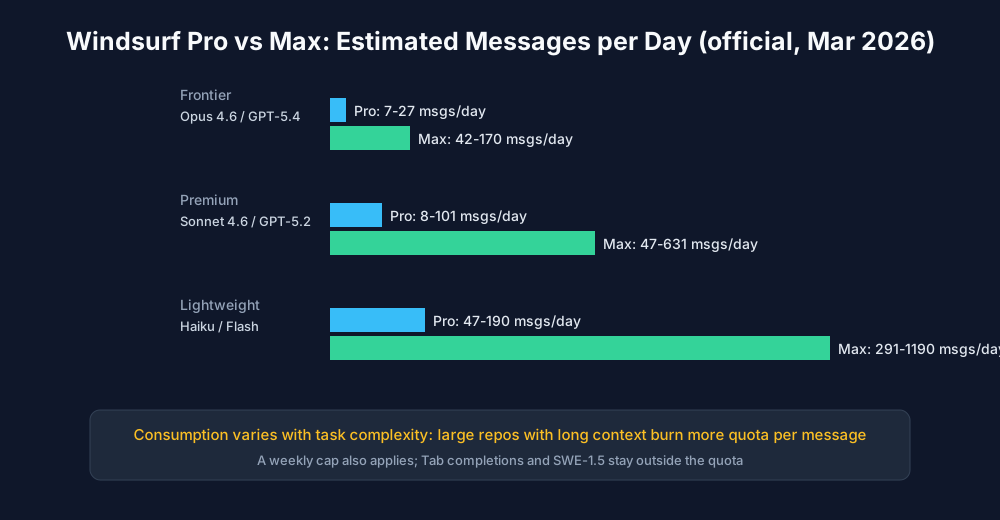
Cognition published its own estimates for how many messages each tier covers per day, and the numbers swing widely with model choice. On Pro, frontier models such as Opus 4.6 and GPT-5.4 cover an estimated 7 to 27 messages per day, mid-tier models like Sonnet 4.6 stretch to 8 to 101, and lightweight Haiku or Flash models reach 47 to 190. Max raises those ranges to 42-170, 47-631 and 291-1190 respectively. A weekly cap applies on top, and the estimates assume a mix of task complexity.
 🔍 View full resolution
Two things stay outside the quota on every plan: Tab completions and the in-house SWE-1.5 model, which Cognition markets as running far faster than premium frontier models. If your day is mostly inline completions with agents on SWE-1.5, the $20 quota stretches a long way; if you keep Opus-class agents busy all day, Max or API-priced extra usage becomes the real budget line.
Verdict: Which $20 Editor Fits Your Workflow?
Choose Cursor if: you want the largest plugin ecosystem, predictable per-request usage deduction, and a mature agent track record on large refactors; its $200 Max tier, about 20x the Pro allowance per Windsurf's comparison page (checked November 2026), still covers the heaviest agent days.
Choose Windsurf if: you are an existing subscriber holding the grandfathered $15 or $30 rate, or a new user who values unlimited Tab completions, the quota system's predictable monthly cost, and Cascade's project-level agent work at the same $20 price.
Choose neither if: budget rules everything: GitHub Copilot Pro still undercuts both at $10 per month (GitHub pricing page, checked November 2026) and runs in VS Code, JetBrains, Visual Studio, the CLI and on mobile.
Try it: cursor.com/pricing